How Google Promotes Chrome

Is Chrome the most heavily promoted Google product? Like for many other products, Google "buys" AdWords ads to promote Chrome, but there are many other places where you can find Chrome ads.


When it was launched, Google placed a link on the homepage which stayed there for a week. At the same time, Chrome gained a prominent placement on Google Japan's homepage, next to services like YouTube or Gmail:


Andreas spotted an ad for Google Chrome in Taipei :


Starting from today, YouTube promotes Chrome on the homepage and the bottom of every page:


The promotion is similar to the last month's ad from orkut:


If you download Chrome from one of these sites, Google will append a RLZ parameter to each Google search URL. "RLZ contains some encoded information, such as where you downloaded Google Chrome and where you got it from. This parameter does not uniquely identify you, nor is it used to target advertising. This information is used to understand the effectiveness of different distribution mechanisms, such as downloads directly from Google vs. other distribution channels," explains Chromium Blog.

It's unclear whether Google "will do well to expand its business", but Chrome seems to be a part of a strategic initiative to make Google more visible on the desktop, a mix between Google Toolbar, Google Desktop and Gears that turned into a browser and that needs a critical mass to be taken seriously.
Read the full post »

SMS in Gmail Chat

Gmail is about to introduce a new Labs feature that will let you send SMS messages to your contacts from the US, announces InformationWeek. Google explains how it works:
You can send SMS messages to your contacts' mobile phones using Gmail Chat. To do so from Gmail:

1. Enter your contact's name in the 'Search or invite friends' box in Chat, and select Send SMS from the box of options that appears to the right of your contact's name. Or, if you already have a Chat window open for this contact, just click Video & more, and select Send SMS.
2. In the dialog box, enter a phone number in the 'Send SMS messages to this number' field. For now, this feature works only on United States phone numbers. If you're outside the US, you can still use it, but you won't see the SMS option in Chat until you enable it manually in the Chat settings page.
3. Click Save.
4. A Chat window appears. Just type your message as you would normally. When you hit Enter, the message will be sent to the phone number you entered.

If your contact replies, the text message response will appear as a reply in Chat. These conversations are stored in your Chat history just like regular chats (but keep in mind that you can’t go off the record while communicating via SMS).
The nice thing about Gmail SMS is that each user gets a virtual phone number that facilitates replying to messages. "To write back, reply to the message as you would any other text message, and your message appears as a Chat message in your friend's Gmail account. If you don't want to receive any SMS messages from Gmail, reply with the command STOP. If you'd like to block the person who sent you the message, but still be able to get Gmail SMS messages from other contacts, reply with the command BLOCK," informs Gmail's help center.


You probably noticed the reference to a new Gmail option called "Video & more", which suggests that Gmail could add video chat. I don't see the new feature, but InformationWeek mentions that it will be slowly rolled out to all Gmail users and it will only be enabled by default if you are in the US.

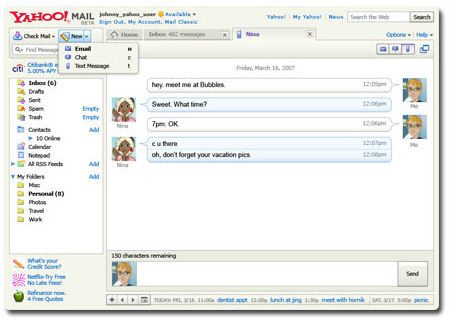
Yahoo Mail added a similar feature last year: "From my Yahoo! Mail window (and using my comfortably full-sized keyboard), I can type a note to my son, letting him know I'm on my way to his soccer practice, and send it straight to his phone. And he can send a text message right back to my email, letting me know where to meet him. The intuitive, chat-like interface makes it super easy, even if you're a novice at text messaging."


Even more than Yahoo Mail, Gmail wants to integrate all your communication channels, so it allows you to pull messages from other email accounts, chat with Google Talk and AIM users. The integration with GrandCentral is also bound to happen.

Update: The launch has been delayed. "We found a glitch. When you'd try to turn it on, it wouldn't fully enable. We thought about keeping it out there -- bugs and all -- but the experience wasn't that great. So, in the spirit of Labs, we've pulled SMS chat back to fix it, and we'll get it back out to you as soon as it's ready -- probably within 2 weeks, so stay tuned." AOL must be happy.

Read the full post »

Gmail Modes

If you can't access Gmail, try some of these URLs:

Safe mode - http://mail.google.com/mail/?labs=0. It disables the experimental features from Gmail Labs, just in case some of them are buggy. You can remove some of the features from Gmail's settings page.

Secure mode - https://mail.google.com/. It encrypts the traffic between your computer and Gmail's servers. Use it from public computers, Wi-Fi networks or to bypass some proxies and web accelerators. There's a Gmail setting that redirects the standard version to the secure mode ("Always use https").

Older version - http://mail.google.com/mail/?ui=1. This version has been replaced in October 2007 by a rearchitectured Gmail, but the old version is a little bit faster.


Basic mode - http://mail.google.com/mail/?ui=html. It's the version that doesn't use JavaScript, so it loads faster and it works well with older browsers. Unfortunately, many Gmail features are missing (contacts autocomplete, chat, spell checker, rich formatting) and each click loads a new page. If you like this version, click on "Set basic HTML as default view" at the top of the page.

Mobile mode - http://mail.google.com/mail/?ui=mobile or http://m.gmail.com. This is a simplified Gmail interface for mobile phones that has even less feature than the basic mode. Use it if no other Gmail mode works for you.

iPhone mode - http://mail.google.com/mail/x/gdlakb-/gp/. A more user-friendly mobile version for iPhone and other mobile phones that use WebKit-based browsers.

iGoogle gadget - http://www.google.com/ig/gmailmax. This is the canvas view for the updated Gmail gadget which can be found in the new iGoogle. Some people found that this interface bypasses most corporate filters that prevent them from accessing Gmail at work.

"No browser checking" mode - http://mail.google.com/mail?nocheckbrowser. If you use a cutting-edge new browser and Gmail serves you the basic HTML mode, try this URL to bypass browser detection.

Read the full post »

New Default Groups for Google Contacts

Gmail added three new built-in contact groups. "Friends, Family, and Co-workers are groups to help you organize your contacts. You can move contacts in and out of these groups at any time. Various Google products let you share information with people in these groups. In addition, you can create a Google profile to help people in these groups keep in touch with you. They will be able to easily find your profile from various Google products."

iGoogle is one of the services that will use these groups for managing your shared activities. One size doesn't fit all, so separating your contacts could simplify the way you share and receive information.


If you don't like the new groups, the bad news is that you can't delete them. Try to ignore them, but keep in mind that they'll be useful at some point.

Google has three other default contact groups: My Contacts (manually-added contacts), Suggested Contacts (email addresses collected from your conversations) and Most Contacted (20 frequently-used email addresses). Google no longer automatically adds email addresses to My Contacts. "Only contacts that you've edited, imported or added to a group will remain in My Contacts. This will provide everyone with a clean slate and, we hope, a better point for syncing contacts with mobile devices."

Read the full post »

150,000 of Google Profiles

Google wants to index all the existing public profiles of Google users, so it created an index of sitemaps and placed the address at google.com/robots.txt. Since the Sitemap protocol has been adopted by all major search engines, creating a sitemap is the easiest way to inform search engines about a large number of web pages from your site that don't have backlinks.

The sitemaps include about 150,000 Google profiles and this seems to be the number of people who took the time to create a profile in Google Maps, Google Reader and the other services that integrated the unified profiles. Since Google didn't promote this feature, the number of people that create a profile will increase once it becomes more visible.

As Jérôme Flipo noticed, Gmail started to link to the profiles pages of your contacts, probably only for Google Talk friends.


To create or edit a profile, visit this page and enter as much or as little as you want. "A Google profile is simply how you present yourself on Google products to other Google users. With a Google profile, you can easily share your web content on one central location. You can include, for example, links to your blog, online photos, and other profiles such as Facebook, LinkedIn, and more," explains Google.

Read the full post »

Use Multiple Google Accounts Simultaneously in Google Chrome

Google Chrome's incognito mode is less sophisticated than IE8's InPrivate browsing, but it has a feature that will be useful for those who have more than one Google account.

When you open a window in incognito mode (Ctrl+Shift+N), your cookies from the standard session are no longer available and you can easily log in to a new Google account.


Chrome's help center has more details about this feature. "Webpages that you open and files downloaded while you are incognito won't be logged in your browsing and download histories; all new cookies are deleted after you close the incognito window. You can browse normally and in incognito mode at the same time by using separate windows." Michael Jeffrey explains that "incognito mode is a window-level mode - all pages viewed within this window are not persisted to the user's history, and incognito pages use a temporary cookie store that is blank at the start of the incognito session".

When you close the incognito window, all the cookies are deleted so you need to log in again the next time you browse in incognito mode. This trick can be used for any other services that allow multiple accounts, but you can only use two accounts at the same time: one in a standard window and the other one in incognito mode.

Read the full post »

Better Performance in Google Desktop 5.8

Google Desktop announces that the latest release focuses on performance and that's a great thing, considering that many users call Google Desktop a memory hog.

Google Desktop 5.8 improves the memory usage during startup, has a faster shutdown and detects the gadgets that slow down your computer. "To reduce memory usage, increase stability and reduce memory fragmentation, we reduced the number of different processes that Google Desktop runs, and we now recycle some of our processes frequently."


The blog post doesn't mention the biggest performance improvement: Google Desktop's main feature, indexing the files from your computer, is no longer enabled by default. In Windows Vista, Google uses the index created by Microsoft's desktop search service. If you want to enable Google Desktop's index, you need to select "Enable Enhanced Content Indexing" when you install the software or in the options page.


Enable additional features by using Google Desktop's index:

* Backup and view previous versions of your documents
* Search your web history, Gmail, and more
* View thumbnail previews of your images, videos, and web history


Google Desktop's wording makes you think that the "enhanced content indexing" is an advanced feature, when it should be the main feature of the software.

If you do enable desktop search, the initial indexing is much faster and the overall performance has been improved.

Read the full post »

The iGoogle Experiment

iGoogle Developer Blog announces developers that the experimental version of iGoogle is a success and that more users will be a part of the experiment.


"It's been a few weeks since I've provided an update on the status of the canvas view launch. Our experiments with a small percentage of users have been going well, and we've been making some small changes and adjustments based on user feedback (such as reducing the width of the left nav). In the next few weeks we plan on ramping up the number of US English users with the canvas view."

Canvas view is one of the features from a major update for iGoogle that will bring support for OpenSocial gadgets, activity streams and more social apps. The trouble is that Google randomly selected a list of users to join the experiment, without providing a way to opt-out*. Most people didn't understand the implications of the update and only noticed the new design (the horizontal tabs have been replaced by a vertical menu), the missing functionality (you can't move a gadget to a different tab) and the broken gadgets (Gmail's canvas view displays the messages inside iGoogle, but it doesn't have a reply button).


Some people complained in iGoogle's discussion board, but Google didn't admit its mistake and continued to expand the experiment. Here's an interesting comment from a user:

"Your methodology is very heavy-handed. I am a retired executive from the old-days of computing (IBM and the BUNCH). We could never have imagined changing the interface of our customer's tools without asking permission. In many cases, we would have to support old versions of software for years after we thought we had newer and better products, just because our customers had gotten used to the way the old versions worked and had modified their habits to accommodate us. It would be considered the highest form of arrogance to force changes on them without their permission. Part of the wrath you are hearing from your users is because of your methodology, and the fact that it's way too hard to give you feedback."

Things have changed and web applications update much faster, often without providing an option to revert to a previous version. But it's extremely arrogant to replace a working version of a popular application like iGoogle with an unfinished version, without providing a way to opt-out. iGoogle was supposed to be a personalized Google homepage, a place where you can choose your favorite gadgets, feeds, themes.

When Flickr started to test a new interface for the dashboard, it placed a small link: "Would you like to try a new version of this page?". FriendFeed used a different address to test a new design and improve it based on the feedback. Gmail still links to the "classic" version to test how many people are satisfied with the new one. But iGoogle decided to try a different path and many unhappy users migrated to My Yahoo, Netvibes or other similar services.

"Our experiments with a small percentage of users have been going well, and we've been making some small changes and adjustments based on user feedback (such as reducing the width of the left nav). In the next few weeks we plan on ramping up the number of US English users with the canvas view."

Read the full post »

Google News for Blogs

Google Blog Search's homepage has been updated and it now includes a list of popular stories, which are categorized and clustered similarly to Google News.

"Blog Search uses a set of algorithms to try to determine the most popular stories in the blogosphere. We consider factors such as a blog's title and content, as well as its popularity throughout the rest of the blogging community. Then we display groups of posts that are closely related," explains the FAQ.


It seems that Google Blog Search didn't select some authoritative blogs to be listed on the homepage and almost any blog post could be included in a Blog Search cluster. There are 11 categories: politics, US, world, business, technology, video games, science, entertainment, movies, television and sports, but they aren't equally represented.

Google shows a chart for the number of blog posts that discuss a story:


Unfortunately, Google is not able to detect spam posts, plagiarism, forums or blog comments. Google Blog Search doesn't provide yet feeds for the top stories and the search results aren't clustered.


The new Blog Search homepage is a decent alternative to the technology-focused Techmeme and to Technorati's front page. Hopefully, Google will filter the low-quality posts and it will integrate the service with Google News.

Read the full post »

The Invisible GoogleUpdate.exe

Most of the recently released Google software uses live installers that download the required files from Google's servers and enable an auto-updater. Whether you want to install Chrome, Gears, Lively or Google Earth's plug-in, Google first downloads a small setup file that needs an Internet connection to obtain the software.


The most important reason why Google doesn't provide offline installers for these applications is the auto-update software, which has a separate development cycle. Instead of integrating an auto-update feature in all the applications, like in Picasa, Google Desktop or Google Toolbar, Google decided to create an independent tool that deals with keeping Google software up-to-date.

"GoogleUpdate.exe is a software component that acts as a meta-installer and auto-updater in many downloadable Google applications, including Google Chrome. It keeps your programs updated with the latest features. More importantly, GoogleUpdate allows your Google applications to be rapidly updated if security flaws are discovered," details Google.

Web applications can be easily updated and everyone gets the latest version, but desktop software needs to be updated manually or by the software itself. Google chose to automatically update most of its applications, in many cases without providing an option to disable the updates and without informing the user when a new version is installed.

GoogleUpdate automatically runs in the background when you start your computer and it connects to Google's servers every few hours to check if there are updates and to report some usage data.

"When GoogleUpdate communicates with Google servers, it sends IDs of GoogleUpdate-managed applications on your computer and general usage information for these applications. GoogleUpdate also uses its own, randomly-generated unique ID number to accurately count total users. This information includes version numbers, languages, operating system, and other install or update-related details, such as whether or not the applications have been run."

GoogleUpdate is installed as a system service, which can be disabled from the services console, but there's no transparent option to uninstall it. It also installs the GoogleOneClick plug-in for Firefox, IE, Chrome that allows Google to launch the updater directly from a web page. If you kill GoogleUpdate.exe from the task manager, a scheduled task will reopen the service when your computer is idle. Google says that the service is uninstalled a few hours after you uninstall the last application that uses it. "Google Update Service uninstalls itself when there is no Google software using it. It may take a few hours after uninstalling Google software for Google Update to uninstall."

To make things even more difficult for those who manually remove the updater, "you may find that your Google programs no longer function properly and, in many cases, you may see GoogleUpdate return automatically".

Even if the software's intentions are noble, it's unfortunate that Google doesn't inform users about the updater and it doesn't provide an option to disable GoogleUpdate or to ask before downloading updates.

Read the full post »

No More Definition Links in Google Search

One of the easiest ways to find definitions for words and idioms was to do a Google search and then click on the words from Google's blue bar. Google linked to dictionary.com until 2005, when it switched to the more comprehensive answers.com. Unfortunately, the feature is no longer available and users will have to find other ways to get definitions.


Here are some other ways to find definitions using Google:

1. search for [define word] and you'll get a short definition for your word, most likely from WordNet. To get other definitions from different glossaries and dictionaries, click on "web definitions for...". Example: define cup.


2. a shortcut for finding a list of definitions from the web is to use the define: operator. Just search for define:cup and you'll get a lot of definitions from a variety of source, but not all of them are authoritative.

3. subscribe to the Merriam-Webster OneBox to add a special search result with definitions.


According to Search Engine Land, Answers.com got 20-25% of its traffic from the Google definition links in 2007 and there wasn't any paid deal between Google and Answers.com. The only other important search engine that shows definition links is Yahoo, but it doesn't use a third-party service.

Read the full post »

Google Tests Image Search Ads

TechCrunch reports that Google started to experiment with displaying ads next to image search results. This isn't a surprise, since Google announced in May that it intends to test display ads.


There are different formats and positions for the ads, which combine a small image with a standard text ad. Steve Poland spotted a blended ad that looked deceivingly similar to an image result.

"The big insight of Google wasn't text ads; it was that the ads should be conducive to the format. We were doing text-based search that was all textual. Visual ads don't work in that format," explained Marissa Mayer in February, when Google started to test video ads next to web search results.


Google Image Search prepares to become more useful by adding options to find similar images, recognize faces and objects. The new features will increase the site's popularity and will attract more commercial queries that could be monetized using display ads.

Read the full post »

Google Chrome Tips

Here are some not-so-obvious things you can do in Google Chrome, the minimalistic browser launched on Tuesday.

1. Show the list of recently visited pages from the current tab: right-click on the "Back" button. This also works for the "Forward" button.


2. Undo closing a tab: press Ctrl+Shift+T or open a new tab and check the "Recently closed tabs" section.

3. Focus on the default search option in the address bar: type ? before entering your query.

4. Perform simple calculations and unit conversions using Google Calculator by simply typing the expression in Google Chrome's address bar (or "omnibox"). To copy the answer, select the suggestion.


5. If you need more space in a textarea, resize it by dragging the lower right corner.


6. Monitor the resources used by a web page - right click inside the page, select "Inspect element", switch to the "Resources" tab and reload the web page. You'll see a list of images, scripts and objects loaded from the web page and you can sort them by size or by loading time.


7. Detach a tab and open it in a new window - just drag the tab outside the active window. You can also add it back to the original window using drag and drop.


8. After downloading a file, you can copy it to the desktop or to any other folder by using drag and drop directly from Google Chrome.


9. If the search engine of a site supports OpenSearch, you can add it to Google Chrome's search box by simply visiting the site and performing a search. The domain name automatically becomes a keyword and you should only type the first letters from the URL until you see "press Tab to search example.com". Then press Tab and type your query.


You can also manually add search engines, by right-clicking on the address bar and selecting "Edit search engines". Here's one example, where you can see that you need to find the URL for the search results page and replace the query with %s:

Name - Wikipedia
Keyword - wiki (that's what you need to type in the address bar)
URL - http://en.wikipedia.org/wiki/Special:Search?search=%s

You can also use the keywords for other kinds of services: for translating web pages, for bookmarking pages online or simply as aliases for web pages (omit "%s" from the URL).

Name - Google Translate (English)
Keyword - trans
URL - http://translate.google.com/translate?u=%s

10. Do you want Google Chrome without Google's branding and with an open source license (BSD license)? Check Chromium, the open source project created for Google Chrome. You can install the latest snapshots for Windows or download the code and build it in Windows, Mac, Linux.

To install Chromium in Windows, go to the most recent directory from this page (it should be at the top) and download mini_installer.exe. Note that these snapshots could be less stable than the version available at google.com/chrome and you may need to manually update Chromium.

Read the full post »

top